
Clean all the leaves!

Game Guide & Reference

Beginner's GuideClean all the leaves!

This page is the first-hour plan: what the game actually is, what to do in your first five minutes, and the order of operations that turns leaves into a working loop. If you have never opened the game, start here — the detailed pages (tools, upgrades, yards, classes, currency, co-op) are linked where they matter instead of being repeated.

What You're Playing

Your friends left for vacation and left you one job: clean every leaf in the yard before they return. It sounds simple — until you find out they have been hiding something from you all along. The goal in every yard is the same: clean the leaves, and reach 100% completion across the map to unlock the secret ending.

The whole game is one loop: collect leaves → sell for Cash → buy tools and upgrades → unlock more map → repeat, each pass faster than the last. That is it. Everything else in this guide is about doing that loop without wasting time.

Your First Five Minutes

Three moves get you from zero to a working economy:

  1. 1

    Sweep the nearest dense pile into your bag.

    Your starter bag is small (0/25 leaves in recent builds) — start close to the sale point, because collecting far away with a tiny bag creates dead walks.

  2. 2

    Dump it at the sale point and sell.

    The yard's dump facility (called the vent, sale area or garbage bin in different videos) converts a full bag into Cash — this is the moment you learn the cash UI.

  3. 3

    Buy your first bag upgrade.

    A bigger bag cuts sale trips, which is the single biggest early time-saver in the game.

After that, the loop runs itself; your job is to make it faster.
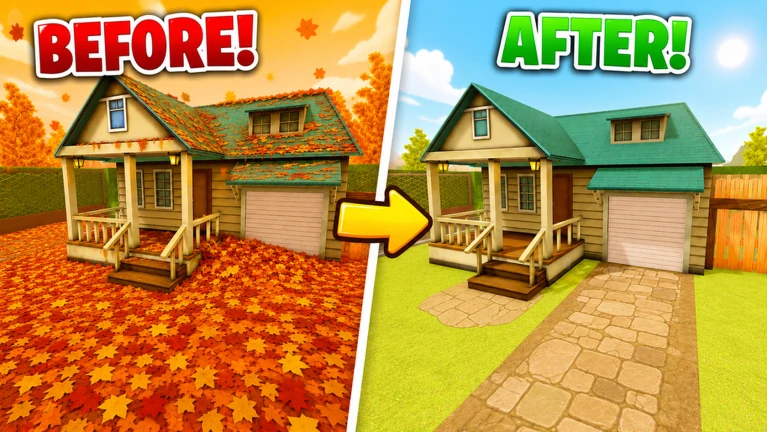
The same house before and after a full leaf clear

The game guides you here. A tutorial is built in: on spawn, step-by-step prompts appear in the lower right (e.g. "Step 1: Buy an upgrade for Yield and Capacity!"), and a Quests panel on the left walks you through opening the garage and using the Journal (the collection log and map tasks). A "tutorial's done" notice appears when it finishes.

The Core Loop, Step by Step

  1. 01

    Collect leaves.

    Cleaning works several ways in footage: walk over leaves and they clear (hand mode), press E to interact with them, or click to clean — upgrading "Hold the click" lets you hold the left mouse button and drag across leaves. Tools (rake, blower) are used by holding the left mouse button. Start with the closest dense patches and stay near the sale point until you understand travel time.

  2. 02

    Sell leaves for Cash.

    When the bag is full — or nearly full — sell. Sitting on a full bag "just one more pile" is the classic beginner trap: every minute spent full is a minute of zero income.

  3. 03

    Buy and equip better tools.

    Open the buy/equip flow as soon as you can afford a meaningful upgrade. Buying a tool does nothing until you equip it — owning it in inventory while still using your hands wastes the purchase. This is the most common tool mistake in the game.

  4. 04

    Upgrade the bag.

    Bag upgrades reduce sell trips. After your first tool bump, bag capacity is usually the next highest-leverage purchase, and bigger bags make distant map parts viable.

  5. 05

    Unlock map parts.

    With cash and better gear flowing, start opening gated spaces — the garage button puzzle, vents, and areas that open as you clear. More map means more leaves, more Cash, and progress toward 100%.

Movement

There is no separate sprint key. Movement speed is a shop upgrade: buying Walk Speed makes your character move faster by default — hold the movement key to travel at your current speed.

  • Move slowly over dense piles so you do not overshoot and leave stripes of leaves behind — precision beats speed while cleaning.
  • Use your speed on long transfers — between dirty zones, the sell point, the upgrades shop and unlock interactions.
  • A full bag plus a quick trip home beats wandering with no capacity. Walk Speed upgrades pay off as the map grows.

Your First Hour

A realistic first-session sequence (about one focused hour):

  1. Minute 0–5

    Clear a starter patch and sell immediately — learn the cash UI and the vent route.

  2. Minute 5–15

    Buy the first affordable tool upgrade and equip it.

  3. Minute 15–30

    Save for a bag upgrade before long sightseeing runs.

  4. Minute 30–45

    Visit the upgrades shop and note what is gated behind cash vs. unlocks.

  5. Minute 45–60

    Attempt early garage button / vent interactions when you find them.

A strong first session ends with: a better tool equipped, a bigger bag, a clear mental map of sell and shop locations, and at least one unlock attempt understood.

First Purchases

Community consensus, in order: bag capacity first, then the Rake, then save toward the Leaf Blower.

  • Skip small stat levels early — the Cash is better saved for the Rake ($7) and the Leaf Blower ($30).
  • The Leaf Blower is your first major mid-game goal: it clears whole batches in one pass and changes how the game feels.
  • Remember the pairing rule: a fast rake with a tiny bag still means constant walking — bag and tool are bought together.

Full shop prices and buying order:

Tools page

Upgrade branch priorities:

Upgrades page

Beginner Mistakes

  • Staying on your hands too long.

    Hand-picking is the slowest state in the game; treat every early sell as progress toward a real tool.

  • Selling partial bags.

    Every half-empty dump is wasted travel time.

  • Buying tools but not equipping them.

    The game does not auto-equip — always confirm your active tool.

  • Ignoring the bag.

    Tool upgrades feel great and underdeliver if you are constantly walking to sell.

  • Hunting for promo codes.

    There are no verified active codes for this game — codes from other leaf games do not work.

  • Downloading "auto clean" scripts.

    They are unrelated to progression and risk your Roblox account.

The Interfaces You'll Meet

The upgrades shop

Where tools, bags and upgrades are bought. Items are gated either by cash (affordable or not) or by unlocks (they appear only after garage/map progress). Check both before saving for something.

The class / loadout menu

A HUD panel (often labeled Class or Role, or shown as a character silhouette) where classes are unlocked and equipped.

Classes page

The yard map

Shows your progress bar and gates; use it to see how close the next unlock is.

Map & Unlock Awareness

  • Blocked routes are quest markers, not scenery.

    A locked door or gate is the game telling you a condition exists — clear the approach, find the interaction, solve the puzzle.

  • Find the sale point before you start sweeping.

    The route between piles and the sale point defines your efficiency; spot it on the way in. It looks like a square or round metal grille set into the ground or against a wall (called the vent, sale area or garbage bin in different videos) — sweep or blow leaves into it to convert them to Cash.

  • The garage button puzzle is real.

    A confirmed system with one or more buttons; solve it and you open a leafy interior.

  • Vents are not just sale points.

    In some areas they are traversal routes into pockets you cannot reach on foot.

Details and routes: Yards & Map page

Playing With Friends

Co-op is a great way to learn — servers support up to 12 players. If you join a friend's lobby as a new player, take a quiet edge lane next to an experienced player rather than the garage puzzle on minute one, and let the collect → sell → buy rhythm settle before exploring vents. Full team structure: Co-op page

FAQ

What is the first thing I should do?

Sweep the nearest dense pile into your bag, dump it at the sale point, sell, then buy your first bag upgrade. The sweep-sell-upgrade loop is the heart of the game.

What should I buy first?

A bag upgrade, then the Rake. A bigger bag cuts sale trips — the biggest early time-saver — and the Rake adds the first noticeable clear speed.

How do I unlock the next yard?

Two ways: pay the Cash price shown on the gate (e.g. the garage costs ~$1), or fully clean the previous area to 100%. Some areas need both.

Are there promo codes?

No verified public codes are active at the time of writing. Do not pause your session for rumor strings from other leaf games.

Can I play with friends on day one?

Yes. Online co-op supports up to 12 players. Agree on lanes and who handles unlocks before the garage button fight starts.

Ready to go deeper?

The detailed guides pick up where this page stops — shop prices, upgrade branches, unlock routes, currencies, classes and team play.